
Microsoft 365 Setup and Support in Clayfield, Brisbane Northside
Need a better email solution for your business? Microsoft 365 is the answer. It’s used by the majority of SMBs in the world, and its an excellent fit for even the smallest businesses!
Setting up Microsoft 365 from scratch or moving from another provider can be confusing. Whether you’re upgrading from an old Exchange server or switching from a basic IMAP setup, we handle the backups of your existing data, DNS setup and propagation, mailbox and storage migration, and setting up your devices
We do it all for you, so you can focus on running your business instead of trying to be an IT guy.
★ 4.8
Google Rating
⚙ Over 50,000 Successful Repairs
✓ Trusted by Brisbane locals since 2009
Why Choose Fix My Laptop

Microsoft 365 often causes issues when it is set up incorrectly. We configure accounts, domains, and services across laptops, desktops, and MacBooks so everything works as expected. This ensures reliable email, proper sync, and clear user access from the start.
We don’t just set it up and walk away. We provide ongoing management and staff training to ensure your team actually knows how to get the most out of your Microsoft 365 subscription, without the confusing tech jargon.
When Microsoft 365 Setup or Support that Makes Sense
Common situations where proper setup and support saves time and avoids costly mistakes.
Email Not Syncing Across Devices
Legacy POP and IMAP accounts don’t always sync in real-time. Microsoft 365 accounts are easy to set up on laptops, desktops, tablets and phones, and your email and folders will look the same no matter what device you are using.
New Business Setup or Migration
Setting up Microsoft 365 from scratch or moving from another provider can be confusing. We manage the complete technical setup, ensuring your accounts, custom domains, and core DNS services are configured securely and correctly from day one.
Seamless Migration
Moving from Google Workspace, old Exchange servers, or IMAP setups frequently included with the website hosting? We migrate your historical emails, calendars, and files with minimal downtime, so your business never skips a beat.
Staff Training & Ongoing Support
We don’t just install it and leave. We provide ongoing maintenance and support for your team to confidently use OneDrive, SharePoint, and Teams.
Are You Using a Free Email Service for Your Business?
Many small businesses use free email accounts from their Internet Provider or services like Gmail, Outlook, or iCloud. It may seem fine at first, but it can cause issues as your business grows.
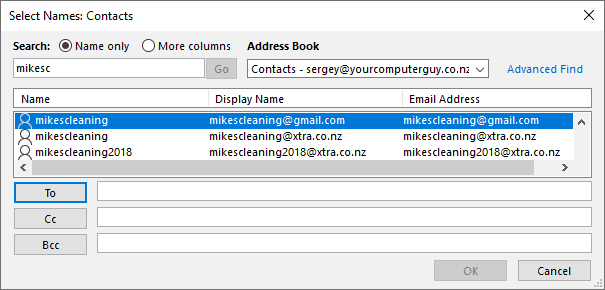

Free email addresses might be costing you sales. Which one looks more trustworthy: brisbaneelectrician@bigpond.com or info@brisbaneelectrician.com.au?
When you use a free email, you miss the chance to promote your own business. Instead of showing customers where to find you online, you end up advertising your internet provider.
Your brand can also lose credibility. If you run a cleaning company and use mikescleaning@bigpond.com, anyone could create mikescleaning2018@bigpond.com or mikescleaning@gmail.com. Customers could easily get confused and contact the wrong person.
Free services rarely come with real support. When your account stops working, there is no one reliable to call. Google, for example, will not offer personal help for Gmail users. Even if you reach someone, there is no guarantee they can fix the issue.
Free emails are also less secure. Hackers often target accounts from Telstra, Optus, and iiNet. Once hacked, you could lose all your emails and contacts. Worse, your address might start sending spam to your customers. That damages your reputation and forces you to start again with a new email and business cards.
Free email services can also disappear overnight. In 2017, Vodafone in New Zealand shut down its email platform. Users with @clear.net.nz or @vodafone.co.nz had to make new accounts and notify every contact. Imagine the hassle of doing that for your business.
Your messages are also more likely to be marked as spam. Filters often flag free addresses like Gmail, Hotmail, or Yahoo because spammers use them too. As a result, your emails might end up in junk folders instead of your client’s inbox.
Are You Really Serious About Your Business? Wait, It Gets Worse…
It simply looks unprofessional. Which one of these messages do you want to send to your potential customers?

Some business owners still hesitate to invest in reliable email, thinking it’s an unnecessary expense. In reality, a professional domain name and Microsoft 365 email account are small costs that deliver big results. They help your business appear organized, trustworthy, and established from the very first contact.
When an email is sent from a personal account instead of a business address, it can raise doubts. Clients may wonder if your company is legitimate or if you’ll still be around when they need follow-up support. Using a custom domain shows that you take your business seriously and value your clients’ confidence.
Getting Your Own Domain Is A No-Brainer!
Your domain and website is one of the cornerstones of a successful business
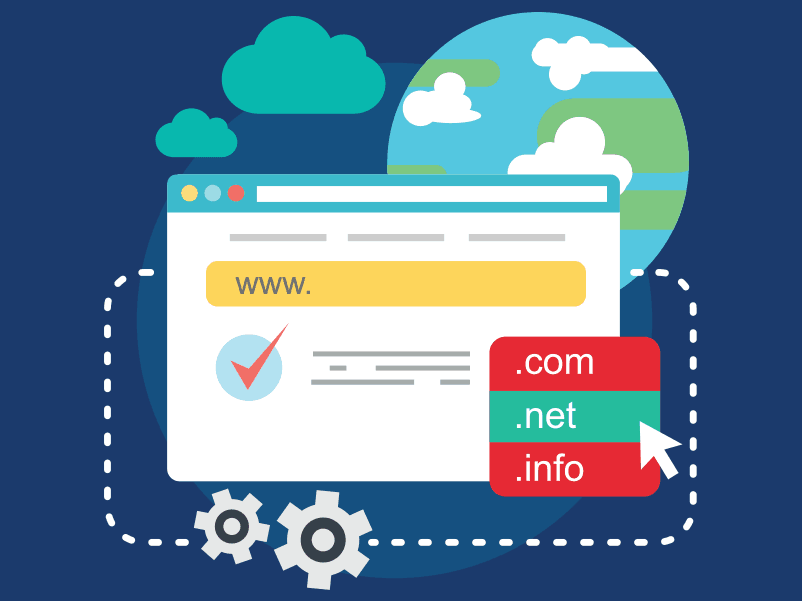
A professional online presence doesn’t have to be expensive. A domain name typically costs around $50 per year, depending on the extension and whether you need help setting it up. Basic website hosting can start at around $10 per month, although a growing business may benefit from a more reliable plan.
Your website doesn’t need to be elaborate. A simple page with your business name, logo, contact details and a clear description of your services gives potential customers a way to find you and understand what you do.
Your domain also lets you use an email address such as hello@yourbusiness.com.au. Most hosting plans include email, but if you’re setting up Microsoft 365, you can connect your domain and manage your business email there alongside Outlook, Teams and your other Microsoft tools.
But We Already Have Our Own Domain and Emails…
Most website hosting companies offer free or low-cost email services, but you get exactly what you pay for

Having an address like hello@yourbusiness.com.au is a good start. But the address is only one part of your email setup. The service behind it determines how easily your team can manage messages, calendars and contacts as your business grows.
Email included with website hosting can work well for basic needs. Depending on the provider, though, you may have limited storage or need separate steps to sync calendars and contacts across devices. POP and IMAP handle email; they don’t sync your calendar and contacts on their own.
With Microsoft 365, you can keep your existing domain and email addresses while moving your mailboxes to Exchange Online. Your email, calendar and contacts work together in Outlook, and you can add tools such as Teams and OneDrive according to the plan you choose.
What is Microsoft 365?
Microsoft 365 (formerly known as Office 365) is the enterprise-grade cloud-based email solution.

Many small businesses start with a setup that seems to do the job: email hosted with their website and connected to Outlook through IMAP, a Microsoft 365 Personal or Family subscription for Word and Excel, and business files stored in someone’s personal OneDrive.
The difficulty is that these are separate accounts. IMAP syncs email, but not calendars and contacts. Business files may sit in an owner’s or employee’s personal OneDrive, making access and handover harder when someone leaves. There’s also no central place to manage the team’s accounts and access.
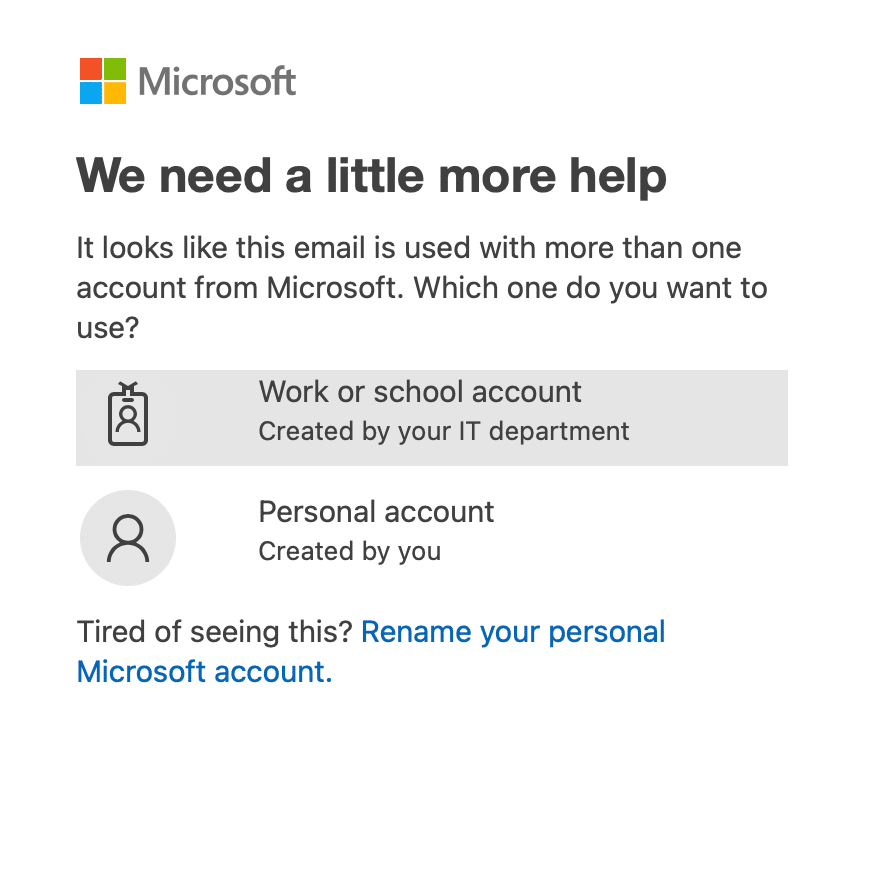
You may have seen Microsoft ask whether you want to sign in with a “Work or school account” or a “Personal account” using the same email address. That’s because they’re two separate accounts. Choosing the wrong one can make your files or subscription appear to be missing. Creating a business account doesn’t automatically move what’s stored in the personal one.
Microsoft 365 gives you a more organised setup, with your business email, calendars, files and everyday work tools together in one place. It lets you use your existing domain, with Exchange Online managing the mail behind them.
Depending on the plan you choose, your team can also use Outlook, Word, Excel, OneDrive and Teams. You can access your work from your computer, phone or browser, share files with colleagues and manage user accounts as your business grows.
With a properly configured Microsoft 365 business account, adding Outlook on a new computer or phone is usually as simple as entering your email address, signing in and approving the security prompt. Outlook finds the mailbox settings automatically and brings in your email, calendar and contacts.
With website-hosted IMAP email, you may instead need to find the incoming and outgoing server names, ports and security settings, then enter them on each device. Even when the email connects, your calendar and contacts may need a separate setup.
Microsoft 365 Pros and Cons
Understand what Microsoft 365 does well and where it may not suit every setup.
Pros
- One account for everyday work – Access your business email, calendar and contacts through your work account, instead of managing separate IMAP and personal Microsoft accounts.
- Simple setup on new devices – Sign in to Outlook with your work account and it can find your mailbox settings automatically.
- Work from different locations – Use your email and files on a computer, phone or browser. Desktop apps and files saved for offline use remain available when your connection drops.
- Easier collaboration – Share documents and work on them together using OneDrive and SharePoint, rather than emailing different versions back and forth.
- Generous Cloud Storage – Each user gets 50 GB of email storage and 1TB of OneDrive/SharePoint cloud storage. Keep all messages organised and accessible in the cloud.
- Control over staff access – Add accounts for new employees and remove access when they leave. Available security controls depend on your plan and how it is configured.
- Security You Can Trust – Protect your business with enterprise-grade security, multi-factor authentication, and 24/7 spam filtering.
Cons
- Internet Connection Requirements – Microsoft 365 needs a reliable connection to sync the emails and files, but desktop apps and synced files can be used offline.
- Ongoing subscription costs – You pay for user licences over time. The cost and flexibility depend on the plans and billing terms you choose.
- Initial migration takes care – Moving from IMAP email and personal OneDrive accounts requires planning, especially if business files and contacts are spread across devices.
- Microsoft changes its apps – Features and layouts are updated regularly, which can mean occasional adjustments for your team.
- There’s a learning curve – Email may be straightforward, but SharePoint, file sharing and security settings need to be set up properly to be useful.
- Backup and recovery still need a plan – Microsoft provides ways to recover some deleted items and earlier file versions, but those features have limits. Decide how long you need to keep important email and files, and whether you need a separate backup.
- The cheapest plan may not include the desktop apps you expect – Microsoft 365 Business Basic includes web and mobile versions of Word and Excel, but not the installed desktop versions. Check the plan before replacing an existing Office subscription.
How Much Does It All Cost?
Once we understand your needs and review your current setup, we’ll provide a clear estimate of the work involved. This helps you know what to expect and plan accordingly.
There are two costs to consider: the Microsoft licences you pay for each user and the one-time work to set everything up.
For a new business with no existing email or files to move, setup is usually straightforward. We create your business accounts, connect your domain, configure email and security, and help you sign in on your devices. We’ll need to make a few changes to your domain’s DNS settings; you can give us the appropriate access or make those changes with our guidance.
If you already use website-hosted email, Google Workspace or personal OneDrive accounts, the work depends on what needs to be moved. We’ll review your mailboxes, contacts, calendars and files before providing an estimate. Larger mailboxes, multiple devices and scattered business files can add time, so we won’t promise a fixed migration time without checking your setup first.
When it comes to monthly costs, Microsoft 365 is flexible and adapts as your business grows. It’s licensed per user, so every employee who uses email will have their own license. The same license can be used on all devices owned by that user, including their home computer if needed.
Shared mailboxes such as sales, info, or support can be accessed by several team members and don’t require a license. You can also mix and match plans. If some staff only need email access without desktop apps, you can save money by choosing lower-cost licenses.
Microsoft 365 can be billed monthly or annually. Annual commitments are usually cheaper, while monthly plans offer more flexibility.
Which Microsoft 365 Plan Do You Need?
|
Plan |
Best for |
What it adds |
Monthly Price (excl GST) |
|---|---|---|---|
|
Exchange Online Plan 1 |
Staff who only need business email |
Email, calendar and contacts |
AUD 6.00 |
|
Microsoft 365 Business Basic |
Staff who mainly work online and don’t need desktop Office apps |
Business email, 1 TB OneDrive, SharePoint, Teams, and web/mobile Word, Excel, PowerPoint and Outlook |
AUD 10.50 |
|
Microsoft 365 Business Standard with Copilot |
Staff who need the full Microsoft Office apps installed on their computers |
Everything in Business Basic, plus desktop Word, Excel, PowerPoint and Outlook |
AUD 21.00 |
|
Microsoft 365 Business Premium with Copilot |
Businesses that need stronger security and management for staff devices and accounts |
Everything in Business Standard, plus advanced security, threat protection and device management |
AUD 32.90 |
Note: Microsoft Australian list pricing shown per user, per month, excluding GST, with an annual subscription. Microsoft 365 Business plans shown include Teams. Pricing and inclusions are subject to change and will be confirmed when preparing your quote.
Setup and Support Cost
Pricing depends on setup complexity, number of users, and configuration requirements.
Our labour rate stays the same whether you need a new Microsoft 365 setup or a migration from existing email and file storage. The total cost depends on the number of users, how much data needs to move, and the work needed to configure your accounts and devices.
We’ll review your current setup and provide an estimate before starting. Most setup and migration work can be done remotely or at your business premises. We can also work from our Clayfield workshop, but that usually makes sense only for a small setup with a few people. For a larger team, bringing in every computer and device that needs configuring quickly becomes inconvenient.
Labour Rates
Workshop/Remote – $200/hr
On-site Visit – $250/hr
Microsoft 365 subscription plans are separate and billed directly by Microsoft.
Choose Your Booking Type
Select the service that fits your situation and location.
On-site Support
Book a technician to visit your home or office for hands-on support. This works best for setups that cannot be moved easily.
Remote Support
Remote sessions allow us to diagnose and fix many issues quickly. This is ideal for software problems and system checks.